
Tech Articles

Since our rebrand, one question keeps landing in our inbox: "Do you still recycle?" Yes, we do. And we'll come get it.
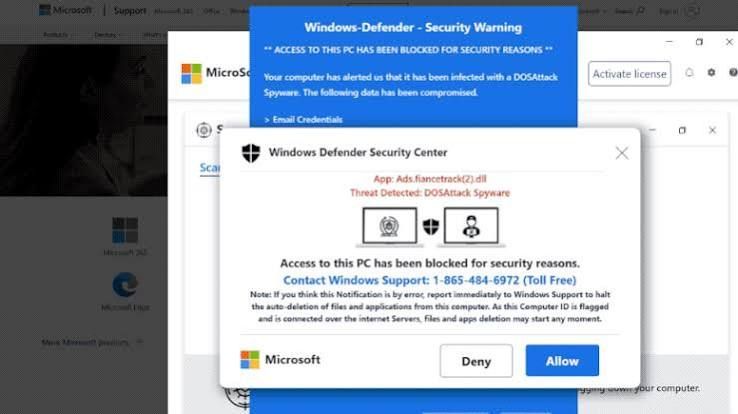
Is That Windows Update Real? How to Spot a Fake in 10 Seconds This month, several of our clients called us before clicking a "Windows security update" message. That was exactly the right move. Here's how you can tell the difference on your own.
Most people think a hacked computer looks like something: a scary popup, a frozen screen, a ransom note. But some of the most dangerous software on a computer never shows itself at all.

Last month a client called us in tears. She'd tried to buy something online for $300, something went wrong with the order, and a chat popped up offering to help. The "agent" had her install a program called UltraViewer so he could "look into it."
We've seen it tones of it in just the last few weeks. Different customers. Different emails. Same result: hacked computers, stolen passwords, and hackers controlling their machines remotely. Here's what's happening—and what you need to know to avoid becoming the next victim.
You get an email from your bank. It says there's a problem with your account. Click this link immediately to fix it. You click. You enter your password. Congratulations—you just gave a hacker everything they need to steal your money. That's phishing. And it's the number one way people get hacked. Here's how to spot it before it's too late.
If you've ever had your screen hijacked by a scary pop-up claiming your computer is infected and demanding you call "Microsoft Support" immediately - you're not alone. These scareware attacks are one of the most common issues we see at Top City Tech, and they're getting more sophisticated every day. The good news? There's a simple fix that takes just a few minutes.
You've got Bitwarden set up. Your passwords are saved. Now what? Websites change. You need to update passwords. You want to add new accounts. Here's how to manage everything in Bitwarden.
You've been using your web browser to save passwords—Chrome, Edge, or Firefox has been remembering them for you. Now you want to move all those passwords into Bitwarden so they're more secure and work across all your devices. Good news: you don't have to type them all in manually. Here's how to move them over.
Create a Bitwarden Account You've been using the same password for everything. Or you write them on sticky notes. Or you constantly click "forgot password" because you can't remember which variation you used. There's a better way. It's called Bitwarden, and it remembers all your passwords so you don't have to. Here's how to set it up.